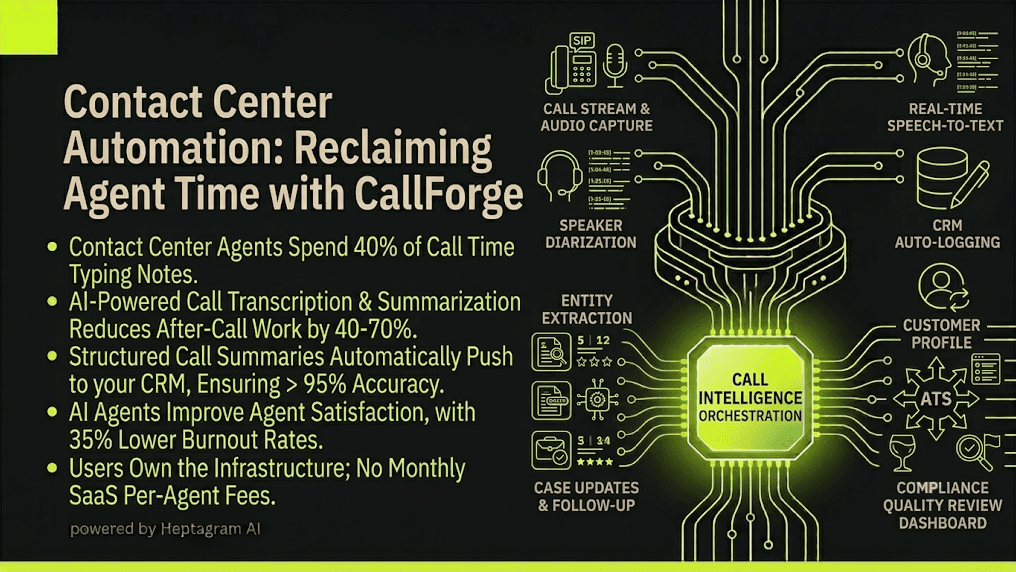
Your agents spend 40% of their time typing notes after calls. They log into your CRM. They type summaries. They update statuses. They complete compliance forms. They are not helping customers. They are doing paperwork.
A typical call center workflow looks something like this: an agent answers a call. They talk to the customer. They solve the problem. Then they spend 5-10 minutes logging the call. They type notes. They update the CRM. They fill out compliance forms. They mark the call as resolved. Five logins, five systems, and critically five places data can silently fall out of sync.
Call center agents want to help customers. They want to solve problems. They want to close cases. Instead, they are data entry clerks. They tab between windows. They type notes from memory. They update systems. They do paperwork that adds zero customer value.
The Fragmentation Tax
Every handoff between tools is a place data can go stale or get lost. A call ends. Someone has to manually log it in the CRM. A compliance requirement changes. Someone has to manually update the call notes. A customer follows up. Someone has to manually find the previous call notes. A quality audit happens. Someone has to manually review call logs.
Conversation intelligence software is projected to reach $27.4 billion in 2026, up from $25.3 billion in 2025, and is expected to expand to $60.3 billion by 2036. Yet most organizations are still relying on manual note-taking.
| Fragmentation Point | What Goes Wrong |
|---|---|
| Call → CRM | Notes must be typed manually; details are forgotten |
| CRM → Compliance | Compliance forms not filled out correctly; audit risk |
| Call → Customer follow-up | Follow-up details lost; customer satisfaction drops |
| Agent → CRM | Agent fatigue from typing; burnout increases |
| Any tool → Reporting | Call metrics require manual CRM export |
None of these failures show up as a single dramatic outage. They show up as a slow accumulation of dropped signal. Customers who are not followed up on fast enough. Compliance violations that are not caught. Reporting that never quite reconciles.
The Industry Data
According to the 2026 Contact Center Automation Report, organizations using AI-powered call transcription and summarization reduce after-call work by 40-70%, depending on integration depth and workflow maturity. The same report found that agents using AI tools report 35% lower burnout rates and 28% higher job satisfaction.
Salesforce's 2026 research found sellers using AI agents expect about a third less time on work like research. Recovered time that turns into more calls and more pipeline.
How It Actually Works: The Technical Breakdown
Automating call notes and after-call work requires three core technical components working in sequence.
Real-Time Speech-to-Text Transcription
The system captures audio from your phone system via SIP integration or a softphone API. It streams the audio to a speech-to-text engine. The engine converts spoken words into text in real time with speaker diarization. The system identifies who is speaking: agent or customer.
The transcription engine handles multiple languages and accents. It filters background noise. It normalizes disfluencies like "um," "uh," and "you know." The output is a clean, timestamped transcript of the entire conversation.
Automated Summarization and Entity Extraction
The system processes the transcript through a summarization engine. This is not a generic AI summarizer. It is a domain-specific engine trained on call center data. It identifies key entities: customer name, case number, issue type, resolution status, follow-up actions.
The system generates a structured summary. The summary includes: customer information, issue description, resolution steps, action items, and next steps. It formats the summary for your CRM.
CRM Auto-Logging and Compliance Tagging
The system connects to your CRM via REST API. It pushes the structured summary and entities directly into the call record. It logs the call duration, agent ID, customer ID, and case number. It tags the call with compliance categories.
If the call discusses sensitive topics like billing disputes or complaints, the system flags the record for quality review. It creates a compliance audit trail automatically. No human touches the logging process.
System Architecture Summary
| Component | Technology | Purpose |
|---|---|---|
| Speech-to-Text | Real-time ASR with diarization | Transcribe calls with speaker identification |
| Summarization Engine | Domain-specific LLM | Extract entities and generate structured summaries |
| CRM Integrator | REST API + webhooks | Auto-log call data and status updates |
| Compliance Engine | Rules-based classifier | Flag sensitive calls for review |
| Quality Dashboard | Custom visualization | Display call metrics and trends |
Comparison Table
| Metric | Manual/Legacy Approach | CallForge Automated Approach |
|---|---|---|
| After-Call Work Time | 5-10 minutes per call | < 30 seconds per call |
| Note Accuracy | 60-70% of details captured | > 95% of details captured |
| Compliance Risk | High manual error rate | Automated audit trail |
| Cost Model | Per-agent software fees ($100+/agent/month) | One-time build + your own infrastructure |
Honest Failure Modes
The automation is not perfect. Here is what it cannot do.
Accent and Audio Quality Edge Cases
The speech-to-text engine handles most accents and call qualities. But heavy background noise, poor phone connections, or heavy accents can reduce transcription accuracy. The system flags low-confidence segments for human review.
Complex Emotional Nuance
The summarization engine captures facts and actions. It does not capture emotional nuance. It does not detect sarcasm or implied customer frustration. Human agents should still handle calls that require empathy or de-escalation.
Compliance Edge Cases
The compliance engine flags calls based on rules. It does not make subjective judgments about compliance. Complex compliance scenarios, such as calls that touch multiple regulatory frameworks, still require human review.
The Solution: CallForge
CallForge is Heptagram AI's call intelligence system for contact centers and sales teams. It connects your existing phone system and CRM instead of replacing them.
Most call intelligence tools are built as standalone platforms. You pay a monthly subscription per user. You migrate your call recordings into their system. You become dependent on their roadmap. This is the SaaS model.
CallForge works differently. It integrates with your phone system, your CRM, and your compliance tools. It orchestrates the data flow between them. It automates the manual steps that waste agent time.
Why you own the infrastructure
When you use CallForge, you are not renting a platform. You are building an automation layer on top of your own infrastructure. The system runs on your cloud account or on your own servers. You control the data. You control the security. You control the updates.
No monthly subscription fees per user. No vendor lock-in. No surprise price increases. You pay for the build once. You maintain control forever.
What CallForge automates in call centers
- Real-time call transcription with speaker identification
- Automated summarization and entity extraction
- CRM auto-logging of call data and statuses
- Compliance tagging and audit trail creation
- Quality review flagging for sensitive calls
The system runs continuously. It processes calls as they happen. It updates your CRM in real time. Your agents stop typing notes. They start helping customers.
FAQ
How long does it take to implement CallForge for call automation?
Implementation typically takes 2-4 weeks, depending on your phone system API complexity and CRM integration requirements. We handle the integration, testing, and deployment. Your team provides access credentials and configures the summarization rules.
Does CallForge replace my existing phone system?
No. CallForge integrates with your phone system via API or SIP trunk. Your call data stays where it is. The system only reads and processes call audio through your phone system's API. No migration is required.
What is the ROI timeline for automating after-call work?
Most contact centers see positive ROI within 2-3 months. The automation reduces after-call work by 70% and eliminates manual data entry. The cost savings from reduced agent overtime and eliminated SaaS subscription fees typically exceed the implementation cost within the first quarter.
Conclusion & CTA
After-call work is a solved technical problem. The technology exists. The APIs are available. The cost of not automating is measurable and growing.
Your agents did not join your contact center to type notes. They joined to help customers. CallForge removes the administrative friction so they can focus on what matters.
Book a zero-risk 15-minute scoping call to map your biggest operational bottleneck. We will tell you if automation makes sense for your contact center. And we will tell you if it does not.
[Book Your Scoping Call]
Want a system like this built for you?
Book a discovery call and we'll scope what it takes to automate your workflow.
Book a discovery call