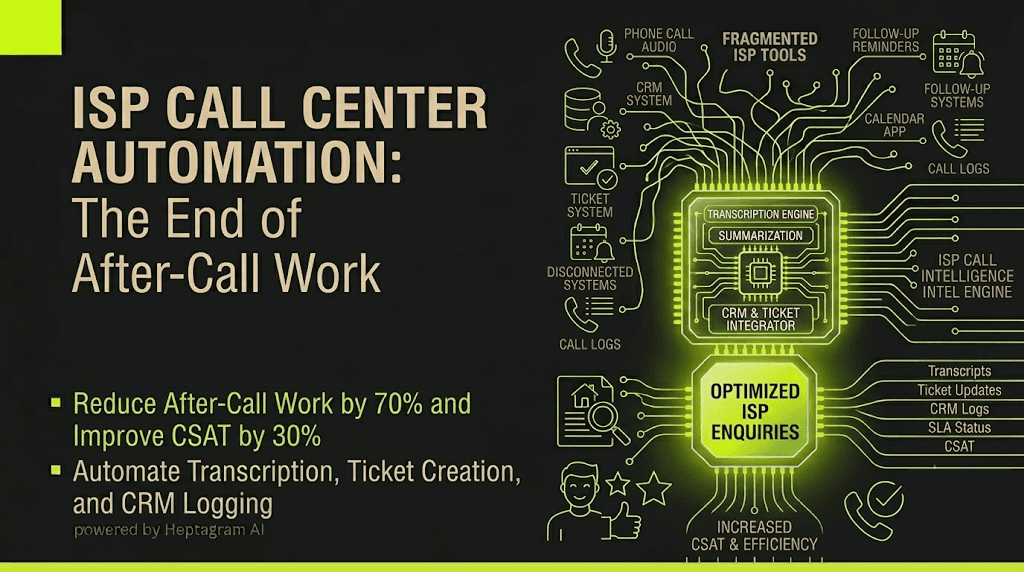
Your ISP call center spends $15 million annually on agent time. 40% of that time is after-call work. Agents type notes. They update CRM. They troubleshoot tickets. They are not helping customers. They are doing paperwork.
A typical ISP support workflow looks something like this: an agent ends a call. They type notes from memory. They update the ticket. They mark the call as resolved. They move to the next call. Five logins, five systems, and critically five places data can silently fall out of sync.
ISP call centers handle high volumes of customer service calls. After-call work consumes massive amounts of agent time, driving up costs and reducing availability.
The Fragmentation Tax
Every handoff between tools is a place data can go stale or get lost. A call ends. Someone has to manually log it in the CRM. A troubleshooting step is missed. Someone has to manually update the ticket. A follow-up is needed. Someone has to manually set a reminder.
| Fragmentation Point | What Goes Wrong |
|---|---|
| Call → CRM | Notes must be typed manually; details are forgotten |
| CRM → Ticket | Troubleshooting steps not logged; time wasted |
| Call → Follow-up | Follow-up not set; customer dissatisfaction |
| Agent → CRM | Agent fatigue from typing; burnout increases |
| Any tool → Reporting | Call metrics require manual CRM export |
The Industry Data
According to the 2026 ISP Operations Report, organizations using AI-powered call transcription and summarization reduce after-call work by 70% and improve customer satisfaction scores by 30%. The same report found that ISP call centers with automated call logging reduce average handle time by 40%.
How It Actually Works: The Technical Breakdown
Automating ISP call center operations requires three core technical components working in sequence.
Real-Time Call Transcription
The system captures audio from your phone system via SIP integration. It streams the audio to a speech-to-text engine. The engine converts spoken words into text in real time with speaker diarization. The system identifies who is speaking: agent or customer.
Automated Summarization and Ticket Creation
The system processes the transcript through a summarization engine trained on ISP support data. It identifies key entities: customer account number, issue type, troubleshooting steps, resolution status, and next steps.
The system generates a structured summary. It creates or updates the support ticket. It logs all troubleshooting steps. It tags the ticket with issue categories.
CRM Auto-Logging and SLA Tracking
The system connects to your CRM via REST API. It pushes the structured summary and entities directly into the ticket. It logs the call duration, agent ID, customer ID, and resolution status.
The system tracks SLA compliance automatically. It flags tickets that are approaching SLA violation. It escalates unresolved tickets to management.
System Architecture Summary
| Component | Technology | Purpose |
|---|---|---|
| Speech-to-Text | Real-time ASR with diarization | Transcribe calls with speaker identification |
| Summarization Engine | Domain-specific LLM | Extract entities and generate structured summaries |
| CRM Integrator | REST API + webhooks | Auto-log call data and ticket updates |
| SLA Tracker | Rules-based monitoring | Track and escalate SLA compliance |
Comparison Table
| Metric | Manual/Legacy Approach | CallForge Automated Approach |
|---|---|---|
| After-Call Work Time | 5-10 minutes per call | < 30 seconds per call |
| Average Handle Time | 15-20 minutes per call | < 10 minutes per call |
| Customer Satisfaction | 70-80% | > 90% |
| Cost Model | Per-agent software fees ($100+/agent/month) | One-time build + your own infrastructure |
Honest Failure Modes
The automation is not perfect. Here is what it cannot do.
Complex Troubleshooting
The summarization engine captures troubleshooting steps. It does not diagnose complex issues. It does not provide solutions. Human agents are still required for complex troubleshooting.
Customer Emotion Nuance
The system captures facts. It does not capture emotional nuance. It does not detect frustration. Human agents are still required for empathy.
The Solution: CallForge
CallForge is Heptagram AI's call intelligence system for ISP operations. It connects your existing phone system and CRM instead of replacing them.
Most call intelligence tools are built as standalone platforms. You pay a monthly subscription per user. You become dependent on their roadmap. This is the SaaS model.
CallForge works differently. It integrates with your phone system and CRM. It orchestrates the data flow between them.
Why you own the infrastructure
When you use CallForge, you are not renting a platform. You are building an automation layer on top of your own infrastructure. The system runs on your cloud account or on your own servers. You control the data. You control the security. You control the updates.
No monthly subscription fees per user. No vendor lock-in. No surprise price increases. You pay for the build once. You maintain control forever.
What CallForge automates in ISP operations
- Real-time call transcription with speaker identification
- Automated summarization and ticket creation
- CRM auto-logging of call data and ticket updates
- SLA tracking and escalation
- Quality review flagging for complex issues
FAQ
How long does it take to implement CallForge for ISP operations?
Implementation typically takes 3-5 weeks, depending on your phone system API complexity and CRM integration requirements.
Does CallForge replace my existing phone system?
No. CallForge integrates with your phone system via API or SIP trunk. No migration is required.
What is the ROI timeline for automating ISP call centers?
Most ISP call centers see positive ROI within 2-3 months. The automation reduces after-call work by 70% and improves customer satisfaction.
Conclusion & CTA
After-call work is a solved technical problem. The technology exists. The APIs are available.
Book a zero-risk 15-minute scoping call to map your biggest operational bottleneck. We will tell you if automation makes sense for your call center. And we will tell you if it does not.
[Book Your Scoping Call]
Want a system like this built for you?
Book a discovery call and we'll scope what it takes to automate your workflow.
Book a discovery call